
Playing PC Games on Android Just Got a Whole Lot Smarter
Mobile gaming has come a long way. Today's flagship Android smartphones pack processors and GPUs powerful enough to rival entry-level gaming PCs, and a growing ecosystem of tools now lets players bring their favorite PC titles with them on the go. But there has always been one persistent headache: figuring out which PC games will actually run well on your phone before you invest time setting everything up. GameNative is stepping in with a smart, practical solution to solve that exact problem.
What Is GameNative?
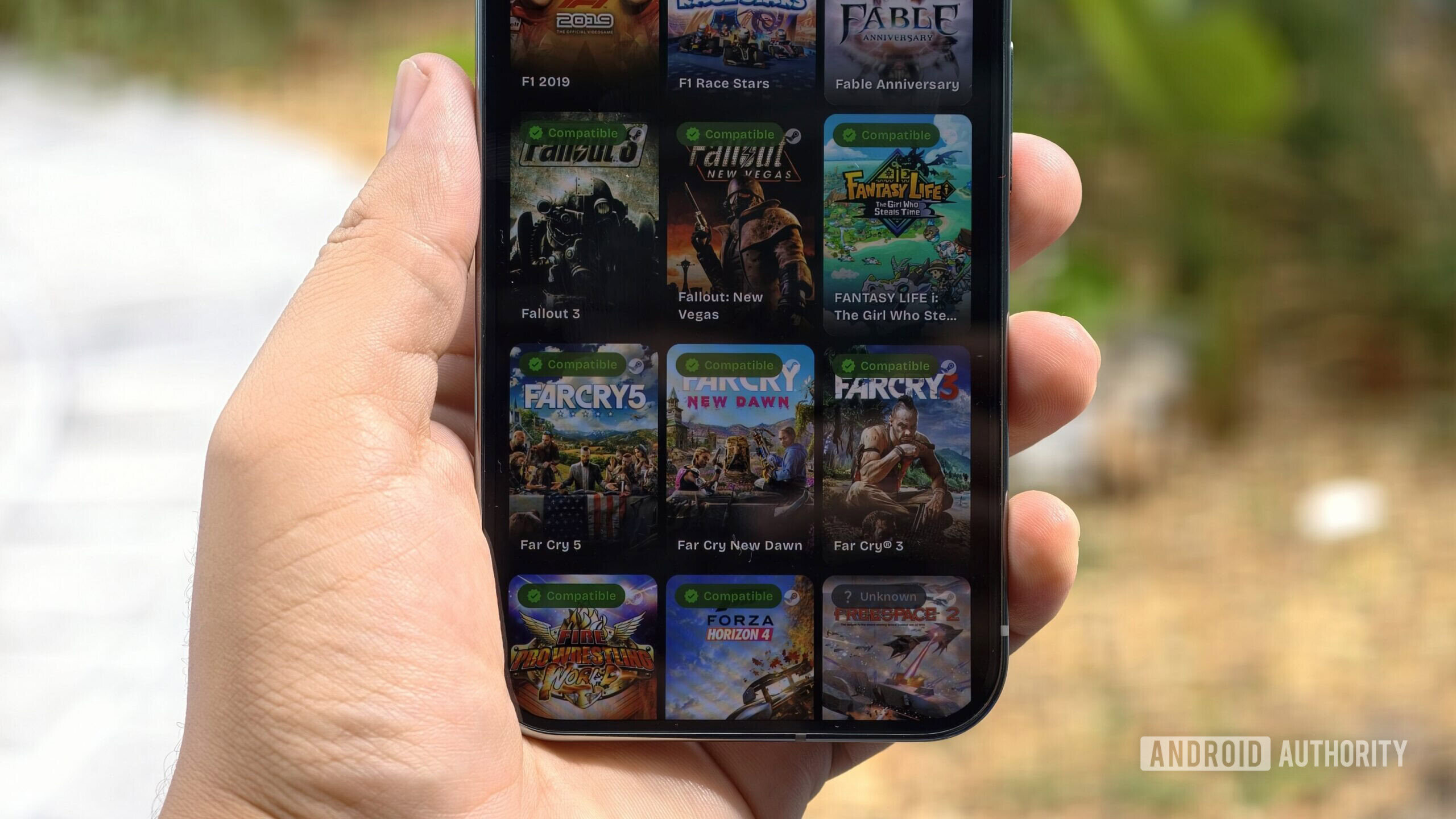
GameNative is an Android application designed to bridge the gap between PC gaming libraries and mobile hardware. Rather than requiring users to blindly test game after game — a process that can eat up hours and lead to nothing but frustration — GameNative gives players an intelligent filtering system that scans their existing PC game library and surfaces the titles most likely to run smoothly on their specific Android device.
The app is aimed squarely at the growing community of Android gamers who want to tap into their Steam or other PC game collections without the guesswork. Whether you own a Pixel, a Samsung Galaxy, or another high-end Android handset, GameNative is designed to tell you upfront what will work and what won't, saving you considerable time and effort.
How the Filtering System Works
The core feature that makes GameNative stand out is its multi-layered filtering capability. Instead of presenting a generic compatibility list, the app allows users to sort and filter their library based on several meaningful criteria.
- User-generated compatibility ratings: GameNative taps into community-sourced data, letting players benefit from the real-world testing of other Android gamers. If hundreds of users have already confirmed that a particular title runs flawlessly on a Snapdragon 8 Elite device, that knowledge is surfaced for you automatically.
- Playability filters: Not every compatible game is actually enjoyable on a small touchscreen. GameNative distinguishes between games that are merely functional and those that offer a genuinely playable experience on mobile, helping users prioritize the best candidates from their library.
- GPU-specific compatibility: This is arguably the most technically impressive part of the filtering system. GameNative can check whether a game is compatible with your device's specific GPU, which means the compatibility results you see aren't generic — they're tailored to your exact hardware configuration.
This combination of filters means users no longer have to rely on scattered forum threads, trial and error, or outdated compatibility charts. Everything they need is surfaced in one clean, organized interface.
Why This Matters for Android Gamers
The Android gaming scene has been evolving rapidly. Tools like Winlator, a popular Android app that lets users run Windows applications and games through an emulation layer, have made it genuinely possible to play PC titles on modern smartphones. But Winlator and similar solutions have always had a discoverability problem: the process of determining which games are worth attempting is largely manual, relying on community wikis, YouTube videos, and personal experimentation.
GameNative addresses this friction point directly. By integrating compatibility data into an app that already understands your game library and your hardware, it turns what used to be a multi-step research process into a quick, filtered browse. For casual gamers who don't want to spend an hour reading Reddit threads before playing, this is a meaningful quality-of-life improvement.
It also lowers the barrier to entry for newcomers to Android PC gaming. Someone who just bought a new flagship phone and wants to explore mobile PC gaming no longer needs deep technical knowledge to get started. GameNative does the heavy lifting and points them straight toward titles that are ready to play.
The Role of Community Data in Mobile Gaming Compatibility
One of the most interesting aspects of GameNative's approach is its reliance on user-generated ratings. Crowdsourced compatibility data has proven itself in other contexts — the ProtonDB database for Linux gaming being a well-known example — and applying the same model to Android gaming makes a great deal of sense.
Community testing reflects real-world conditions in a way that no automated test suite can fully replicate. Users test games across different settings, different Android versions, different custom kernels, and different use cases. The result is a rich, nuanced picture of compatibility that goes well beyond a simple yes-or-no verdict. GameNative leverages this collective knowledge and presents it in an accessible format, giving each user the benefit of thousands of hours of community testing without requiring them to do any of it themselves.
What This Means for the Future of Mobile PC Gaming
GameNative's approach hints at a broader maturation of the mobile PC gaming ecosystem. As Android hardware continues to improve and emulation and compatibility tools become more capable, the main obstacle to mainstream adoption is shifting from raw performance to usability and discoverability. Tools that make it easier to find, set up, and play PC games on Android are the next frontier, and GameNative is positioning itself at the center of that movement.
If the app delivers on its promise, it could become an essential companion for anyone who wants to get serious about playing PC games on their Android device — not just a technical curiosity, but a practical, everyday tool that makes mobile gaming with a PC library feel genuinely seamless.
Final Thoughts
Gaming on Android with a PC library has always been possible in theory, but the reality has often been messier than the promise. GameNative takes a smart, user-focused approach to solving one of the biggest pain points in the space: knowing which games are actually worth trying. With GPU-specific filtering, community compatibility ratings, and playability assessments all in one place, GameNative could be the app that finally makes mobile PC gaming accessible to everyone — not just the most dedicated enthusiasts willing to do hours of research before loading up a single game.
Keep an eye on GameNative as it continues to develop. For Android gamers with a backlog of PC titles waiting to be explored on their phones, this could be exactly the tool they have been waiting for.