
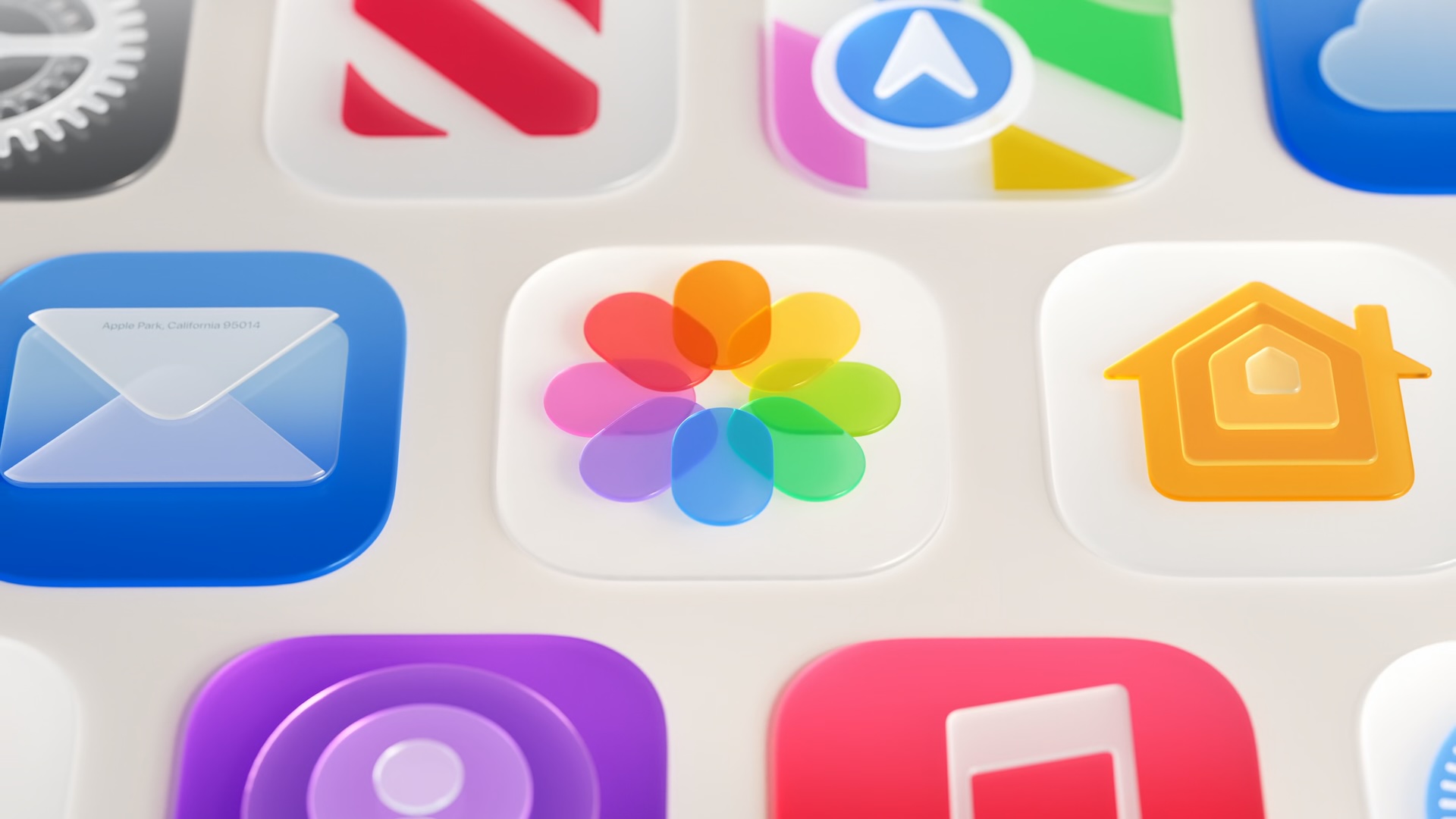
Apple Is Refining Liquid Glass in iOS 27 — Here's Everything That's Changing
When Apple introduced Liquid Glass as the cornerstone of its visual identity at WWDC 2025, the translucent design language immediately turned heads. Its shimmering, refractive aesthetic marked one of the most dramatic interface overhauls Apple had attempted in years. But as with any sweeping redesign, the initial rollout came with growing pains. Users and developers quickly raised concerns about legibility, visual hierarchy, and the lack of customization options. Now, heading into WWDC 2026 and the release of iOS 27, Apple is listening — and the company has announced a broad, meaningful set of improvements to how Liquid Glass looks, behaves, and feels across the entire system.
These changes were first detailed during the WWDC 2026 keynote and then expanded upon at the Platforms State of the Union session, where Apple gave developers a closer look at the technical foundations being reworked. Whether you loved Liquid Glass from day one or found it frustrating to read, iOS 27 is shaping up to deliver a noticeably more polished experience for everyone.
Better Readability: Fixing the Core Complaint
The most consistent criticism of Liquid Glass since its debut has been readability. When the material is placed over complex or high-contrast backgrounds — think a colorful wallpaper, a busy photo library, or a gradient-heavy interface — the text and icons sitting on top of it can become difficult to parse. Apple has directly addressed this issue in iOS 27 by reworking how Liquid Glass handles the content behind it.
Specifically, Apple has tuned the material so it more effectively diffuses complex content beneath the glass layer. Rather than allowing busy backgrounds to bleed through with full intensity, the updated Liquid Glass implementation applies a more controlled diffusion effect that softens and blurs underlying elements just enough to keep foreground content legible without sacrificing the signature translucency that defines the look.
This change alone is likely to make a significant quality-of-life difference for everyday users who interact with text-heavy interfaces, notification banners, control overlays, and navigation bars throughout the day.
Darkened Edges and Brighter Highlights Add Depth
Alongside the readability improvements, Apple has introduced two visual refinements that enhance the sense of depth and dimensionality within Liquid Glass elements. The first is a subtle darkened edge that runs around the perimeter of Liquid Glass components. This edge acts as a natural boundary, helping the eye distinguish where a glass element ends and the background begins — a small but impactful detail that improves visual separation across the system.
The second refinement involves specular highlights. Apple has made these brighter in iOS 27, amplifying the light-catching quality that gives Liquid Glass its distinctive glassy sheen. Together, the darkened edges and increased highlights create a more three-dimensional feel that grounds interface elements more convincingly against varying backgrounds.
These tweaks reflect the kind of iterative tuning Apple is known for — changes that may seem minor in isolation but collectively result in an interface that feels more considered and intentional.
The Transparency Slider: Granular Control for Every User
Perhaps the most headline-grabbing addition coming in iOS 27 is the new transparency slider in Settings. This is a significant departure from the binary toggle that previously existed, which simply let users turn reduced transparency on or off. The new slider gives users granular, continuous control over how much the Liquid Glass effect appears across the system — ranging from ultra clear, which shows the full refractive glass effect, all the way to fully tinted, which suppresses the translucency in favor of a more opaque, traditional look.
This kind of nuanced personalization is something users have been asking for since Liquid Glass launched. Not everyone wants the same intensity of the effect, and different lighting environments, visual preferences, and accessibility needs all call for different levels of interface transparency. The slider directly addresses that diversity without forcing users into an all-or-nothing choice.
For those who love the immersive, layered feel of full Liquid Glass, nothing changes. For those who find it visually noisy or hard to read, a quick trip to Settings now offers a real solution rather than a workaround.
Automatic Improvements for Existing Apps
One of the most developer-friendly aspects of the iOS 27 Liquid Glass updates is that many of the improvements will apply automatically to apps already using the material — without requiring a recompile. This means users won't need to wait for third-party developers to push updates before noticing improvements in their favorite apps. The system-level changes propagate broadly, improving the Liquid Glass experience across the board from day one of the iOS 27 release.
Apple has also confirmed that Liquid Glass continues to adapt intelligently to accessibility settings. Features like Reduce Transparency and Increase Contrast remain fully supported, ensuring that the visual design scales appropriately for users who rely on those accommodations.
What This Means for iOS 27 as a Whole
The refinements to Liquid Glass represent more than a simple visual polish job. They signal Apple's commitment to iterating on its design systems based on real-world usage and user feedback, something the company emphasized throughout WWDC 2026. By strengthening the foundations of how the material is constructed — its diffusion behavior, its depth cues, its accessibility compatibility — Apple is setting Liquid Glass up to be a more durable and versatile design language going forward.
With iOS 27 expected to reach users later this year, these improvements to Liquid Glass will arrive alongside a broader set of platform updates spanning AI features, developer tools, and system performance. For design-conscious Apple users, the refined Liquid Glass experience may well be one of the most immediately noticeable upgrades the new release has to offer.
Key Liquid Glass Changes Coming in iOS 27
- Improved diffusion of complex content behind glass elements for better readability throughout the system
- A new darkened edge around Liquid Glass components to improve visual separation and clarity
- Brighter specular highlights that enhance the depth and three-dimensional quality of the material
- A new granular transparency slider in Settings, ranging from ultra clear to fully tinted
- Automatic improvements for existing Liquid Glass apps without requiring a recompile
- Full compatibility with Reduce Transparency and Increase Contrast accessibility settings
Whether you are a longtime fan of the aesthetic or someone who has been patiently waiting for Apple to refine it, iOS 27 looks set to deliver a Liquid Glass experience that is more readable, more flexible, and more polished than ever before.